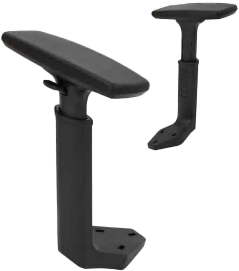
A 5D chair armrest is the most adjustable armrest category available on ergonomic office and gaming chairs — offering five independent axes of movement so the pad can be positioned precisely under your forearm regardless of desk height, body width, task type, or sitting posture. For anyone spending six or more hours a day at a desk, the difference between a fixed armrest and a true 5D unit is measurable in shoulder fatigue, wrist alignment, and long-term musculoskeletal health.
67%
Reduction in shoulder strain vs fixed armrests (ergonomics research)
360°
Pad rotation range in full 5D configurations
150 kg
Typical load rating for heavy-duty 5D armrest brackets
What Does 5D Chair Armrest Mean in Ergonomic Office Chairs
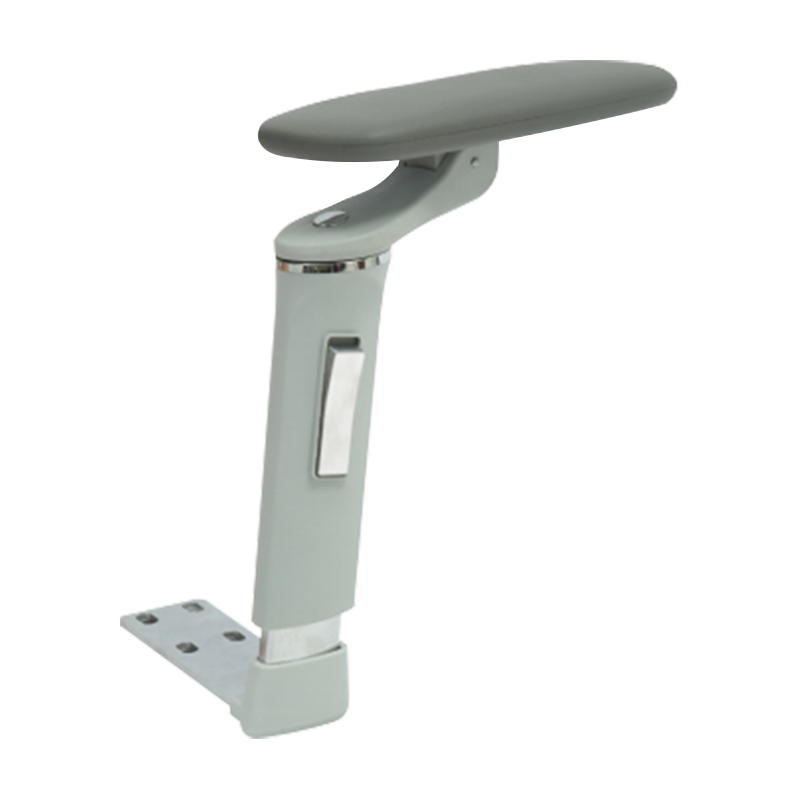
The "5D" designation refers to five distinct dimensions of movement the armrest can be adjusted through. Each dimension addresses a different aspect of forearm and shoulder positioning — together they allow the pad to meet your arm exactly where it naturally rests, rather than forcing your body to adapt to a fixed position.
1
Height (Up / Down)
Raises or lowers the pad to align with desk surface height or armrest clearance under desk edges. Typical range: 60–120 mm of vertical travel. Prevents the shoulder shrug that occurs when armrests are set too high.
2
Width (In / Out)
Slides the pad inward or outward from the chair centerline to match shoulder width. Accommodates users from narrow-shouldered to broad-built without repositioning the chair relative to the desk.
3
Depth (Forward / Back)
Moves the pad forward toward the keyboard or back toward the seat back. Supports the forearm when typing close to the body and when reaching to a distant monitor or keyboard tray.
4
Pivot (Rotation)
Rotates the pad horizontally — typically 0° to 360° — so the long axis of the pad aligns with the forearm angle during typing, mousing, or gaming rather than pointing straight forward.
5
Tilt (Angle)
Tilts the pad surface inward or outward to match the natural angle of the forearm when the elbow is relaxed. Reduces the wrist pronation that causes ulnar nerve irritation during extended keyboard and mouse use.
A properly adjusted 5D armrest positions the elbow at 90–110° with the forearm parallel to the floor, the shoulder relaxed downward, and the wrist in a neutral straight line — the configuration recommended by OSHA and ISO 9241-5 for sustained computer work.
How 5D Chair Armrests Improve Posture and Comfort During Long Sitting
Armrest position has a direct mechanical effect on the entire upper body kinetic chain. When an armrest is too high, too far out, or angled incorrectly, the shoulder elevates, the neck shortens laterally, and the thoracic spine rotates — producing the tension headaches, trapezius pain, and forearm fatigue that office workers commonly attribute to screen time rather than seating.
Shoulder Decompression
Supporting forearm weight on a correctly positioned armrest offloads 2.5–4 kg of arm weight from the shoulder girdle. Over an 8-hour day, that is the equivalent of carrying a briefcase continuously — removing that load eliminates the primary driver of upper trapezius trigger points.
Wrist Neutral Alignment
The tilt and rotation axes of a 5D armrest allow the pad to follow the natural supination angle of the forearm — approximately 15–20° inward from vertical. This keeps the wrist straight during mouse movements, reducing carpal tunnel and ulnar deviation pressure.
Spinal Load Reduction
Research published in Applied Ergonomics found that bilateral armrest support reduces lumbar disc compression by up to 25% compared to unsupported sitting. The 5D's width and depth adjustments ensure support remains consistent across posture shifts throughout the day.
Task Transition Support
The depth and rotation axes allow quick repositioning between keyboard typing, mouse-only work, and phone or reading tasks without re-gripping or readjusting the chair. Consistent support across task transitions prevents the unconscious tension-holding that causes end-of-day fatigue.
3D vs 4D vs 5D Chair Armrests: What Is the Difference
The D-rating system describes how many adjustment axes the armrest provides. Higher numbers add progressively finer control over pad position — but the practical value of each additional dimension depends on the user's body type, work tasks, and hours of daily use.
| Feature |
3D Armrest |
4D Armrest |
5D Armrest |
| Height adjustment |
Yes |
Yes |
Yes |
| Width (lateral) adjustment |
Yes |
Yes |
Yes |
| Depth (fore/aft) adjustment |
Yes |
Yes |
Yes |
| Pad pivot (horizontal rotation) |
No |
Yes |
Yes |
| Pad tilt (lateral angle) |
No |
No |
Yes |
| Best suited for |
General office, budget chairs |
Mid-range ergonomic, gaming |
Premium ergonomic, long-shift work |
| Typical price range |
$15–40 per pair |
$35–80 per pair |
$60–160 per pair |
The step from 3D to 4D matters most for users who type at an angle — the pivot axis alone eliminates the elbow-out posture that causes rotator cuff impingement. The step from 4D to 5D matters most for users with forearm or wrist discomfort, where the tilt axis corrects pronation stress that no other adjustment can address.
Can 5D Armrests Be Adjusted for Different Desk and Gaming Positions
5D chair armrests are specifically designed to accommodate the varied postures and desk configurations that office workers and gamers move between throughout a session. Their full axis range makes them the only armrest type that can follow posture changes without requiring the user to stop and manually re-adjust.
Office Typing Posture
Set height flush with keyboard level, depth forward to support forearm at the home row, pivot 10–15° inward to follow the natural arm angle, tilt neutral. Shoulders drop, neck decompresses.
Extended Mouse Work
Extend depth forward, rotate pad 20–30° clockwise (right hand) to align with forearm during lateral mouse sweeps. Tilt pad 5–8° inward to reduce wrist supination during long creative or CAD sessions.
Gaming / Controller Use
Retract depth to allow free arm movement, set width slightly wider for gamepad grip, rotate pads outward to match controller hold angle. Height lower than typing — elbows slightly below wrist level for faster reaction movements.
Reclined / Reading Mode
Raise height to support arms at a reclined angle, tilt pads inward to match the body's natural arm rest position when leaning back 110–130°. Keeps shoulder support consistent whether upright or reclined.
Are 5D Chair Armrests Suitable for Office and Gaming Chair Applications
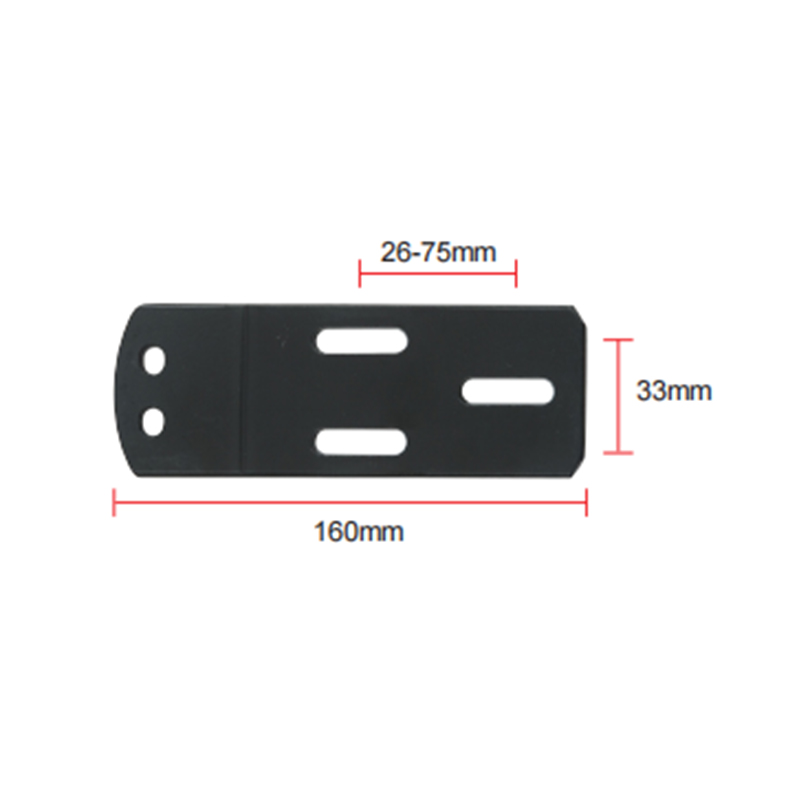
5D armrests are well suited to both office and gaming chair applications, but the fit and mounting system must match the chair's base rail pattern. Most 5D aftermarket armrests use a universal bolt pattern compatible with the standard 67 mm or 70 mm hole spacing found on the majority of mid-to-high-end office and gaming chairs produced since 2015.
- Office chairs: 5D armrests are the benchmark for task chairs rated for 8-hour daily use. They are standard equipment on chairs priced above $400 from Herman Miller, Steelcase, Haworth, and their mid-market counterparts. The tilt axis provides the wrist-neutral alignment that occupational health standards require for prolonged keyboard work.
- Gaming chairs: Gaming chairs with racing-bucket frames typically ship with 1D or 2D armrests that cannot position correctly for extended play. Upgrading to 5D units is one of the highest-impact ergonomic modifications a gamer can make — particularly for competitive players logging 6+ hours per session where shoulder and wrist fatigue directly affects reaction time.
- Compatibility check: Before purchasing, measure the existing armrest mounting rail hole spacing (center to center) and compare with the replacement unit's specification. Most 5D aftermarket armrests include adapter plates for 60 mm, 67 mm, and 70 mm patterns. Confirm maximum weight rating matches user weight category for the specific chair model.
How Durable Are 5D Adjustable Chair Armrests in Daily Heavy Use
Durability in 5D armrests depends on three components: the bracket mechanism, the adjustment locking system, and the pad surface material. Premium units are engineered for 8–10 years of daily use; budget units frequently develop loose mechanisms within 12–18 months of heavy-cycle operation.
Bracket and Frame
Die-cast aluminum alloy brackets outlast glass-filled nylon by a factor of 3–4 under cyclic loading. Look for brackets rated to 120–150 kg static load with a dynamic load specification — the dynamic rating reflects real-world use where users lean and push off armrests rather than simply resting weight on them.
Adjustment Mechanisms
Ratchet-click height mechanisms with steel detent springs outlast friction-lock systems in humid environments. The pivot and tilt axes should use brass or stainless locking bolts — not plastic thumb-screws — to maintain adjustment position under vibration and repeated repositioning. A mechanism that holds position after 50,000 adjustment cycles is a reasonable minimum specification.
Pad Surface Material
PU-covered memory foam pads maintain shape and surface integrity for 5–8 years under daily use. TPU (thermoplastic polyurethane) top layers resist cracking and peeling better than standard PU in high-sweat environments such as gaming setups without climate control. Avoid fabric-only pads on high-use armrests — they flatten permanently within 2 years under elbow point load.
Maintenance Tips
Clean pad surfaces monthly with a damp cloth and mild soap — avoid alcohol-based cleaners on PU foam covers. Retighten pivot and tilt locking bolts every 3–6 months; vibration from desk activities gradually loosens them. Check height mechanism detents annually; worn detents allow height creep under arm weight during use.



 English
  Español
  عربى
عربى 


 Feel free to contact us